If your dehumidifier fan is not working, the most likely explanation is not a broken motor — it is the unit idling at its humidity set point or pausing to defrost. A dehumidifier is designed to stop its fan once the room is dry enough, and to pause during an auto-defrost cycle, so a still fan is often normal operation. Before you write off the motor, work through the settings, tank, and airflow in order. The real electrical faults come last, and they are far less common than a machine simply doing what you told it to.
Safety first: unplug the dehumidifier before you open a panel, clear the intake, or touch the fan blade. The steps below are check-and-reset tasks anyone can do. Anything involving the capacitor, motor windings, or control board is a job for a qualified technician — capacitors can hold a charge even after the unit is unplugged.
Is the room already at your humidity set point?
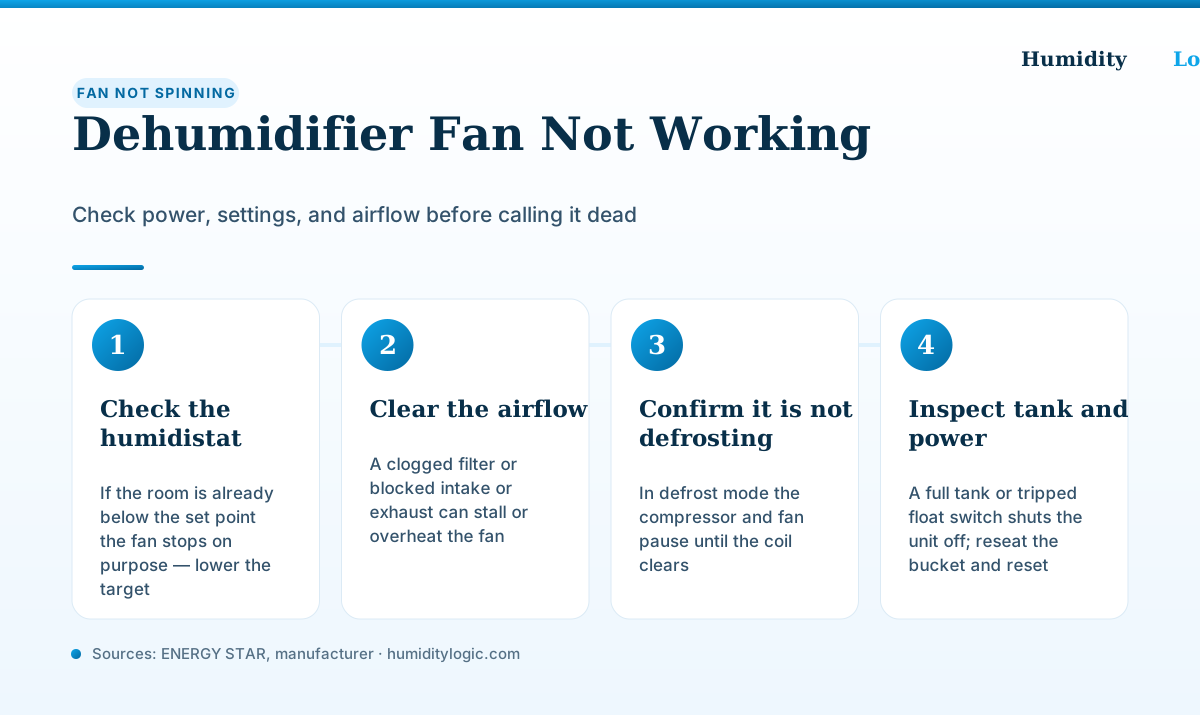
This is the single most common reason a fan “stops working,” and it is not a fault at all. Every ENERGY STAR dehumidifier has a built-in humidistat that lets you set a target relative humidity for the room. Once the air reaches that number, the unit has finished its job and idles — the compressor stops and the fan follows.
According to GE’s support guidance, when a dehumidifier reaches the set relative humidity, the compressor turns off and the fan turns off about three minutes later. It restarts on its own when humidity drifts back above your target. So a fan that runs, stops for a while, then runs again is behaving exactly as designed.
To confirm this is what is happening, lower the target. Set the humidistat to its minimum (often 30 to 35 percent) or select Continuous mode, which runs the unit regardless of the reading. If the fan springs to life within a minute or two, nothing is broken — the room was simply already drier than your previous setting. A good target for most homes is 30 to 50 percent; our guide on what size dehumidifier you need explains how capacity and set point work together.
Keep in mind that the sensor reads the air right at the unit, which can be drier than the far corner of the room. If the dehumidifier sits next to a window that vents dry air, or in the path of an HVAC register, it may satisfy its own reading long before the whole space is comfortable. Moving the unit to a more representative spot — or trusting a separate hygrometer over the built-in display — often explains a fan that seems to quit too early.
Could the unit be in an auto-defrost cycle?
If the fan is running but the compressor is silent — or the whole unit seems to have paused — the culprit may be auto-defrost. Compressor dehumidifiers run their coil close to freezing on purpose, and in cooler rooms a thin layer of frost builds up. To clear it, the unit cycles the compressor off and lets the fan keep blowing room air over the coil until the frost melts.
GE describes this plainly: during defrost, “the compressor will stay off and the fan will stay on until the coils are defrosted.” Frigidaire’s frost-buildup guidance notes the same behavior, since the evaporator operates near 32°F even in normal use. In a room below about 65°F, the unit can spend much of its time defrosting, which looks like a fan that starts and stops for no reason.
Give it time. A defrost pause can last several minutes. If your unit ices up repeatedly, that is its own problem — see why a dehumidifier freezes up for the temperature and airflow fixes. A dehumidifier that defrosts constantly in a cold basement is not defective; it is the wrong tool for the temperature.
Have you checked the tank and float switch?
A full water tank stops everything. Dehumidifiers use a float switch that rides on the water level in the bucket, and when the tank fills, the switch trips and shuts the unit off to prevent an overflow — fan included. A “Full” indicator usually lights up when this happens.
The trap is a float switch that sticks in the full position even after you empty the bucket. As appliance repair guidance notes, a stuck float switch can prevent the fan from running despite an empty tank. So empty the bucket, then reseat it firmly and squarely — a bucket that sits crooked keeps the switch tripped. Wiggle the float to make sure it moves freely. If the fan comes back once the bucket is properly seated, the tank was the whole story.
While you are there, confirm the unit still has power at the outlet. Try a different socket, and check whether a GFCI breaker or the unit’s own reset has tripped. A dehumidifier that shuts off entirely can share symptoms with one that stops collecting water, so rule out power before opening anything.
Is airflow blocked or the filter clogged?
Airflow problems can stall a fan or force the unit to shut itself down. A clogged filter or a blocked intake or exhaust starves the fan of air, which makes the coil ice over or the motor overheat — and the unit’s safety cutout then stops it to prevent damage. GE specifically flags a dirty air filter as a reason a dehumidifier misbehaves.
ENERGY STAR recommends cleaning the filter about every two weeks. Unplug the unit, slide out the filter, wash it in warm soapy water, let it dry fully, and reinstall it. Check that furniture, curtains, or wall clearance are not choking the intake or exhaust grilles — most units want several inches of open space on all sides. Our dehumidifier maintenance guide covers the full cleaning routine.
With the unit unplugged, you can also spin the fan blade by hand. It should turn freely without scraping the housing. Debris, dust, or pet hair wrapped around the blade or blower wheel can jam it — clear anything you find and check the blade is not cracked or rubbing.
When is the fan motor, capacitor, or board actually to blame?
Only after the checks above come up empty. If the room is genuinely humid, the target is set low or on Continuous, the tank is empty and seated, the filter is clean, airflow is clear, and the unit is not defrosting — yet the fan still refuses to turn — you are into real component failures.
The usual suspects are a seized or burned-out fan motor, a failed start capacitor that cannot give the motor its initial jolt, or a faulty control board or humidity sensor that never tells the fan to run. A loose or damaged blower wheel can also bind against the housing and stall the motor, and a wheel that wobbles on its shaft may just need tightening rather than replacing. Repair guidance suggests confirming the motor is getting power before condemning it: if power reaches the motor but it will not turn, the motor itself is defective. GE’s compressor-not-operating guidance walks through related electrical checks. These diagnostics involve a multimeter and live electrical parts, so they belong with a qualified appliance technician, not a DIY session.
Weigh the repair against replacement. A stuck float, dirty filter, or wrong set point costs nothing to fix. A new fan motor or control board on an inexpensive portable unit often costs more than a replacement dehumidifier — and if the machine is several years old, a new correctly sized model will run more efficiently than a patched-up old one. Fix the free things first; they solve the majority of “dead fan” cases.
Frequently asked questions
Why is my dehumidifier fan not spinning?
Most often the unit is idling on purpose because the room is already at or below the humidity you set, or it has paused for an auto-defrost cycle. A full tank or tripped float switch also shuts the fan off. Lower the target humidity to its minimum (or Continuous mode), empty and reseat the bucket, and give it a few minutes before assuming the motor has failed.
Should the dehumidifier fan run all the time?
Only in Continuous mode. In normal mode the fan and compressor stop once the room reaches your set point, and per GE the fan turns off about 3 minutes after the compressor cycles off. It restarts on its own when humidity climbs back above the target, so intermittent running is normal, not a fault.
Why does my dehumidifier fan run but the compressor does not?
That is usually auto-defrost: the compressor cycles off while the fan keeps blowing room air over the coil to melt frost, then resumes. It also happens the moment the room hits your set point, when the fan runs on for a few minutes after the compressor stops. If the compressor never restarts in a warm, humid room, that points to a compressor or control fault needing service.
Can a dirty filter stop a dehumidifier fan?
Yes. A clogged filter or blocked intake starves the fan of airflow, which can ice the coil or overheat the motor until the unit shuts down to protect itself. ENERGY STAR advises cleaning the filter about every two weeks. Unplug the unit, wash and dry the filter, clear the grilles, and retest.
When does a stopped dehumidifier fan mean a real repair?
If the room is clearly humid, the target is set low, the tank is empty and seated, the filter is clean, and the unit is not defrosting, yet the fan still will not turn, the likely culprits are a seized fan motor, a failed start capacitor, or a bad control board. Those are service repairs, and on most inexpensive portable units they cost more than a replacement.
Sources & references
Every figure on this page is checked against these published sources. Last reviewed August 3, 2026.