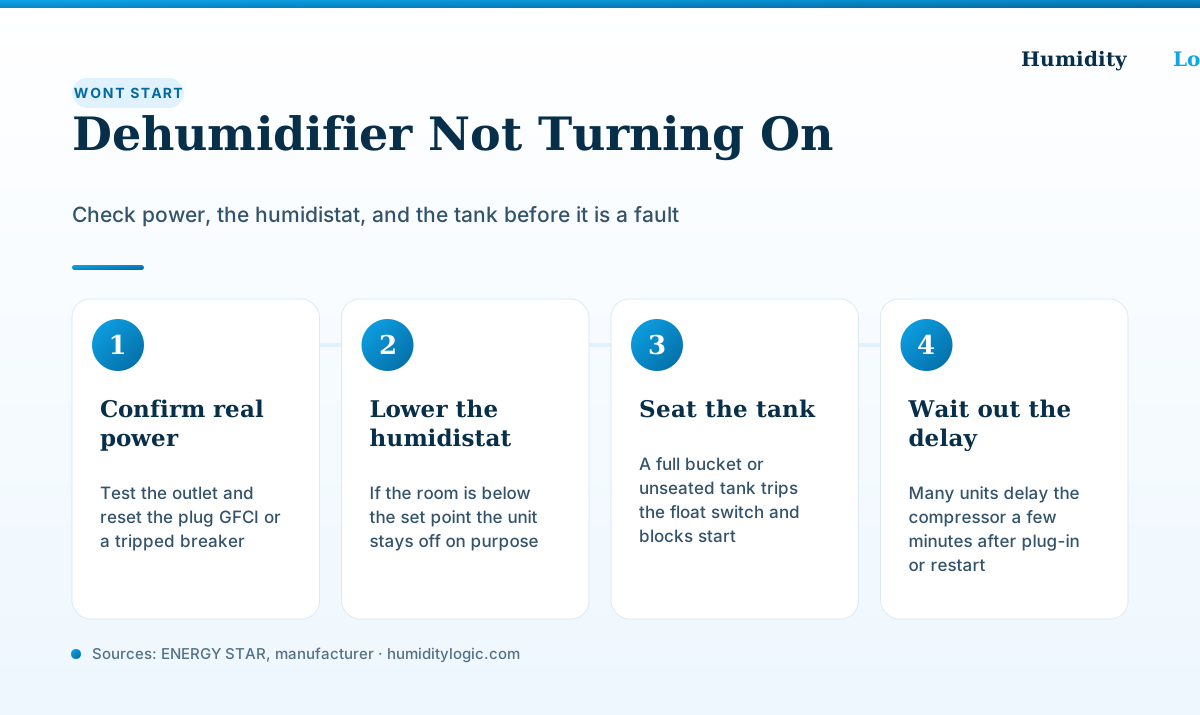
If your dehumidifier won’t turn on, don’t assume it’s dead yet. In most cases the cause is one of four simple things — no real power, a satisfied humidistat, a full tank, or a built-in restart delay — and all four are free to rule out in minutes. Only after those are eliminated is a failed control board, capacitor, or power cord worth suspecting. Work the list in order below before you shop for a replacement or pay for service.
Safety first: for anything beyond pressing buttons, seating the tank, or checking the outlet, unplug the unit. There is no safe do-it-yourself electrical repair inside a dehumidifier — capacitors can hold a charge, and internal work belongs to a technician.
Does the unit actually have power?
A dead dehumidifier is often a dead circuit, not a dead machine — so verify power in three places before anything else.
Start at the plug. Most modern dehumidifiers ship with a leakage-current detection plug (an LCDI or GFCI plug) on the cord, and it has a small RESET button that pops out — trips — if it senses a fault or a power disturbance. According to GE/Haier’s support guidance, the fix is to unplug the unit, press the RESET button on the plug until it clicks and stays in, then plug back in. If the RESET button won’t stay engaged, the plug or cord is damaged and the cord must be replaced — do not keep using it.
Next, rule out the outlet and breaker. Plug a lamp or phone charger into the same wall outlet to confirm it’s live, and check your home’s breaker panel for a tripped breaker, since a large dehumidifier can draw enough current to flip one. The hOmeLabs (Midea) user manual lists exactly this: make sure the plug is inserted completely, and check the house fuse or circuit breaker box. Plug the unit directly into a wall outlet rather than a power strip or extension cord while you test — undersized extension cords cause voltage drop that can prevent the compressor from starting, and manufacturers generally advise against using them at all. If the outlet is dead but the breaker looks fine, the outlet itself may be on a tripped GFCI elsewhere in the room; find and reset that upstream GFCI before concluding the unit is at fault.
Is the humidistat set above the room’s humidity?
This is the most common “it won’t turn on” case that isn’t a fault at all — the unit is simply satisfied.
A dehumidifier only runs when the room is more humid than the target you set. ENERGY STAR explains that the built-in humidistat lets you set the relative humidity you want, and once that level is reached “the dehumidifier will cycle on and off automatically to maintain the level.” GE puts it the same way: outside of continuous mode, the compressor and fan turn off once the set humidity is reached. So if you asked for 50% and the room already sits at 45%, a silent unit is working correctly, not failing.
To test it, turn the humidity target down to its lowest number (or select continuous mode) and wait. On models with a mechanical humidistat you should hear an audible click as the contacts close and the fan spins up. If lowering the set point brings the unit to life, nothing was ever broken — the room was drier than the dial. ENERGY STAR recommends keeping indoor humidity between 30% and 50%, so set your target within that band rather than chasing the lowest possible number. Our dehumidifier humidistat guide explains how the control decides when to run.
Is the tank full or not seated properly?
Every consumer dehumidifier has a float switch that shuts the unit off before the tank overflows — and that same switch keeps it off if the tank is full, misaligned, or pushed in crookedly.
The hOmeLabs manual lists two tank conditions that stop a unit from running: the bucket is full, or the bucket is not in the proper position. Empty the tank, then slide it back in firmly and squarely until it seats — you’ll often feel it settle into place. If the unit still won’t start with an empty, seated tank, the float itself may be stuck. AppliancePartsPros notes that a float stuck in the “up” position mimics a full bucket and holds the machine off, so check that the float moves freely and springs back. If your unit is plumbed for continuous drainage, confirm the hose is attached correctly and draining, because a backed-up drain can trip the same safety. For related tank behavior, see why a dehumidifier stops collecting water.
Could it just be the restart delay?
If you just plugged the unit in, moved it, or reset it, the quietest few minutes are usually by design.
Most dehumidifiers include an anti-short-cycle timer that keeps the compressor off for a short window after power is applied, protecting it from the wear of restarting too quickly. The hOmeLabs manual spells out the interval: after a complete cycle, “the dehumidifier will not start operation … until after three (3) minutes.” During that delay the control panel, lights, or even the fan may be on while the compressor stays silent — which is easy to mistake for a no-start.
So after any power interruption, give it five to ten minutes before you judge it. GE’s own reset procedure leans on this idea: disconnect power for about 30 seconds, restore it, and then set the controls — a soft reset that clears minor control-board glitches. If you want to force a reset, unplug the unit for a few minutes rather than toggling it rapidly at the panel, which can leave the timer counting down again. This same delay is why a unit you just carried up from the basement seems dead for the first few minutes: the compressor is deliberately waiting, not failing to start.
When is it a real fault?
If you’ve confirmed live power, lowered the humidistat, emptied and seated the tank, and waited out the delay, and the unit still won’t come on, you’re now in genuine-failure territory.
At this point the usual suspects are internal: a failed electronic control board that never sends the start signal, a bad start capacitor so the compressor can’t spin up, or a damaged power cord. AppliancePartsPros lists the control board, capacitor, and cord among the components that stop a dehumidifier from starting once the simple causes are ruled out. A telltale sign is a fan that runs while the compressor stays dead silent, or a compressor that hums and clicks off — both point to the capacitor or compressor circuit.
These are not do-it-yourself jobs. Unplug the unit and either book appliance service or check the warranty, because on most portable units a board or compressor repair costs close to the price of a new machine. A related but different symptom — a unit that powers on but the fan won’t spin — is covered in dehumidifier fan not working, and keeping the filter and coils clean, as laid out in our dehumidifier maintenance guide, prevents several of these failures in the first place.
If the old unit is beyond economical repair, size the replacement correctly rather than guessing — an oversized or undersized model just trades one headache for another. Our what size dehumidifier do I need guide walks through it, and you can get a quick answer for your space with the dehumidifier size calculator.
Frequently asked questions
Why won't my dehumidifier turn on even though it's plugged in?
Start with power that only looks fine. The plug on the cord has a reset (GFCI/LCDI) button that can trip, the wall outlet may be dead, or the breaker may have flipped. Reset the plug button, test the outlet with a lamp or phone charger, and check the breaker before assuming the unit itself has failed.
My dehumidifier has power but does nothing — is it broken?
Usually not. If the room is already at or below the humidity you set, the unit is satisfied and idles on purpose. Turn the target down to its lowest setting and listen for a click or the fan starting. Also confirm the tank is empty and pushed fully into place, since a full or unseated bucket trips the float switch and blocks startup.
How long should I wait after plugging in a dehumidifier before it starts?
Give it a few minutes. Many units, including Midea-built models like hOmeLabs, hold the compressor off for about three minutes after power-on or a restart to protect it from short-cycling. The fan or lights may come on while the compressor stays silent during that delay. If nothing happens after five to ten minutes, move on to the other checks.
Where is the reset button on a dehumidifier?
Most dehumidifiers have no dedicated reset button on the cabinet. The reset most people mean is the button on the LCDI/GFCI power plug, plus a soft reset done by unplugging the unit for a few minutes and plugging it back in. GE suggests disconnecting power for about 30 seconds, then restoring the control settings.
When is a dehumidifier that won't start actually a fault that needs service?
After you have confirmed real power, lowered the humidistat, emptied and seated the tank, and waited out the restart delay. If it still does nothing, the likely culprits are a failed control board, a bad start capacitor, or a damaged power cord. Those are internal electrical repairs — leave them to a technician and check the warranty first, since on many portable units the fix costs close to a new machine.
Sources & references
Every figure on this page is checked against these published sources. Last reviewed August 3, 2026.